Imagine: it’s nighttime, the server room is humming, the ventilation is roaring, and you’re trying to control dozens of sparking ASICs all by yourself. A red icon is flashing somewhere in the IP address lists, the chart column is jumping, and you have to quickly switch between dozens of tabs. Sound familiar? It’s in situations like these that many people first hear the name Braiins Toolbox and realize there’s life without endless manual clicking. This article will cover technical details, simple metaphors, and personal observations. It will also include an honest comparison with its most famous predecessor, BTC Tools , which was long considered the standard but now feels outdated.

What is Braiins Toolbox?
Braiins Toolbox is a free program from the Braiins team designed for local management of ASIC miners. It doesn’t require a cloud service or subscriptions, runs on Windows, macOS, and Linux , and lets you monitor your entire mining rig, including hashrate, temperature, and power consumption, with just one click .
Just a couple of years ago, such a utility seemed like science fiction. Before Toolbox, miners used BTC Tools , a convenient but aging scanner that resembled more of a homemade IP address table. BTC Tools did a great job of scanning and rebooting Antminers, but industry developments, the emergence of new ASIC models, and security requirements made it limited. Braiins Toolbox was released as a response to these challenges: it supports multiple miner brands, updates automatically, and features a graphical interface and a command line.
A few words about BTC Tools

To understand how far Toolbox has come, it’s important to remember what came before. BTC Tools is a trusty program for Windows and Linux that can scan a local network, sort ASIC devices, configure mining pools, and even update firmware in batch mode. In version 1.3.4, the developers added sorting by temperature and hashrate, the ability to change frequency and power savings, and even configure multiple pools at once. But BTC Tools has many limitations:
- It is not updated frequently and does not work well with new ASICs;
- It doesn’t have a macOS version , and on Linux it runs via Snap;
- there is practically no user-friendly graphical interface;
- there is no built-in support for dynamic acceleration, auto-tuning, or power consumption restrictions;
- There is no command line or auto-update.
If you’ve been mining for a while, you’ve probably gotten used to BTC Tools. It still works well with Antminers: it can scan the network, display temperature, fan speed, and hashrate, and helps you configure pools and reboot devices. But it’s on a larger scale that its wear and tear becomes noticeable: adding a new pool requires disabling monitoring, changing logins and passwords manually, and setting up a power-saving mode—no.
What makes Braiins Toolbox special?
The advantages of Toolbox are best illustrated by comparison—the Braiins team even published a table listing the features of both products. Unlike BTC Tools, Braiins Toolbox supports not only Antminer, but also Whatsminer, Iceriver, and even the new Avalon series (in development). It runs equally well on Windows, Linux, and macOS, features a user-friendly graphical interface and a full-featured CLI, updates automatically, and allows you to:
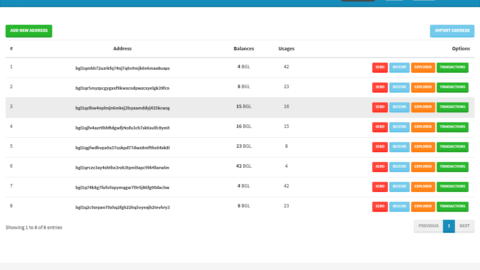
- Detect miners on the network with one click and get a detailed table with IP addresses, hashrate, power consumption, and temperature;
- Batch update firmware , install or roll back Braiins OS on hundreds of devices at once;
- Set power limits or increase miner frequency using Braiins OS autotuning to achieve maximum efficiency;
- configure pools in bulk, distributing the hashrate between multiple addresses, and switching them on the fly;
- export logs and logs to analyze errors;
- “highlight” the desired miner by flashing the indicator to physically find it in the rack;
- Pause or resume mining on selected ASICs without powering off.
Additionally, Toolbox features keyboard shortcuts (a feature added in the December 2024 release) and fully developed command-line scripting support: you can write your own scripts that restart miners on a schedule, change frequencies based on electricity prices, or collect logs.
Installation and first launch
Braiins Toolbox is freely available on the Braiins website and takes up very little space. Download the archive for your operating system, unzip it, and run the executable file. On Windows, it’s simply .exein a folder; on macOS , it’s either [ .dmgor .zip], which is dropped into Applications; on Linux, an executable binary or AppImage is available. No complicated installers or drivers are required.
Once launched, Toolbox opens a local web page (usually http://127.0.0.1:8888), where the interface unfolds. On the first screen, the program prompts you to scan your network—it will automatically fill in an IP address range, but you can change it. After a few seconds, you’ll see a table with all ASIC devices on the network. If your miners have user passwords set, you’ll only need to enter them once, and Toolbox will remember them.
Usage: from simple to complex
Find and manage devices
After scanning, you’ll see a list of miners. Braiins Toolbox displays the model, IP, firmware (stock or Braiins OS), hashrate, temperature, and power consumption. You can sort the list, search by name or IP, and group by type. Each ASIC has a set of actions available: reboot, blink indicator, and pause mining. You can select multiple devices and apply a command to all of them at once—for example, switching a dozen S19s to a different pool.
Firmware and autotuning
If you have stock Antminer firmware, you can migrate to Braiins OS directly from Toolbox. Simply select the desired ASICs, select “Install Braiins OS,” and wait. The program will download the appropriate firmware version and install it. The reverse also works. But most importantly, Toolbox lets you manage power and frequency using Braiins OS autotuning. Specify a watt limit or overclocking percentage, and the firmware will automatically select the optimal setting.
Setting up pools and networks
In BTC Tools, to change a pool, you stop monitoring, fill in the fields, and wait for a response. In Braiins Toolbox, this process is more intuitive: the interface features a separate “Pools” tab where you specify addresses (primary and backup), username, and passwords; choose how to distribute the hashrate between pools; and apply it to the selected devices. Even reserving multiple pools with automatic switching is a matter of two clicks.
Logging and error detection
Newbies often ask: what should they do if their miner turns red or displays errors? BTC Tools simply shows that the IP is unavailable. Braiins Toolbox can download log files directly from the ASIC, allowing a specialist to quickly determine the cause of the failure. This feature is especially convenient for hosting, when you don’t have physical access to the equipment.
CLI: For those who love the terminal
If you enjoy scripting, Braiins Toolbox offers a powerful CLI. You can write commands for mass firmware updates, miner restarts, pool switching, and log export. For example, in Linux, you can set up cron jobs that check nightly for a new version of Braiins OS and automatically install it. BTC Tools doesn’t have anything like this.
Comparison of Braiins Toolbox and BTC Tools
Frankly, comparing these two products is like comparing a smartphone and a feature phone. BTC Tools was once a great solution: it can scan and sort Antminers, lets you change mining pools, reboot devices, and even update firmware. But its list of features almost ends there.
Braiins Toolbox was created as a response to the inconveniences of BTC Tools. It didn’t just add new features—it completely redesigned the miner management system. The official Braiins blog provides a comparison table: Toolbox supports more operating systems, more ASIC brands, has a GUI and CLI, updates automatically, allows you to set hashrate and power targets, collect logs, find devices, pause and restart mining. BTC Tools doesn’t do this.
The most noticeable differences are:
- Platforms and compatibility. Toolbox runs on Windows, Linux, and macOS, supporting Antminer, Whatsminer, Iceriver, and soon Avalon. BTC Tools is Windows and Linux only; there is no official Mac version.
- Updates and development. Braiins regularly releases updates, adding new features and support for new miners. BTC Tools is updated infrequently, and many users complain about the lack of support for new ASICs.
- Power management and auto-tuning. In Toolbox, you can set a power consumption limit or overclock miners, and the firmware automatically adjusts the parameters. BTC Tools only offers basic power-saving modes and manual frequency adjustment.
- Interface. Toolbox has a user-friendly graphical interface with search, filters, and logs, as well as a fully functional CLI. BTC Tools is a fairly simple IP address list with standard buttons.
- Additional features. Toolbox can export logs, flash LEDs to search for devices, pause mining, collect logs, and work with redundant pools. BTC Tools cannot.
This doesn’t mean BTC Tools is completely useless. If you have older Antminers and are running a small Windows mining rig, it can still be useful, especially thanks to its simplicity and familiar interface. But if you want to stay ahead of the curve, manage new equipment, save electricity, and automate processes, Braiins Toolbox is the obvious choice.
Personal experience and a bit of emotion
When I first launched Braiins Toolbox , it felt like getting into a new car with heated seats and cruise control after a long winter. Everything was in its place, everything was readable, and most importantly, there was no need to jump around IP addresses. The second time, when I was asked to help colleagues with an old mining rig on BTC Tools , I felt a slight nostalgia—like opening an old media player with buttons. But after just a couple of minutes, I was ready to get out my laptop with Toolbox and do everything the old way.
I sometimes hear that “newbies won’t understand this tool”—that’s a misconception. Toolbox was created “by miners for miners” and is perfect for those just starting out. The interface is user-friendly, and the opportunities for growth are endless.
Conclusion: Which tool to choose?
If you’re running a mining business and are willing to dedicate time to setting up your rigs, Braiins Toolbox will be your best assistant. It’s user-friendly, supports multiple brands, allows you to automate tasks, and grows with the industry. Its developers are actively adding new features, and the community creates scripts and tips.
BTC Tools remains the “old guard”—simple, familiar, and largely unchanged, yet it works even on low-end machines and requires no training. It might be suitable as a backup or for small test farms.
In today’s world, where reaction speed and energy efficiency are everything, Braiins Toolbox becomes that all-purpose knife you always have in your pocket. And BTC Tools remains on the shelf of history—a reminder of where the path to optimal mining began.
Read more:


 AwesomeMiner v7.7.1 (Crack) [Nvidia/AMD/CPU/ASIC/FPGA]
  Firmware Awesome Miner for Antminer (Download Firmware ASIC)

 AwesomeMiner CPU/GPU/ASIC/FPGA: Download and Configure for Windows